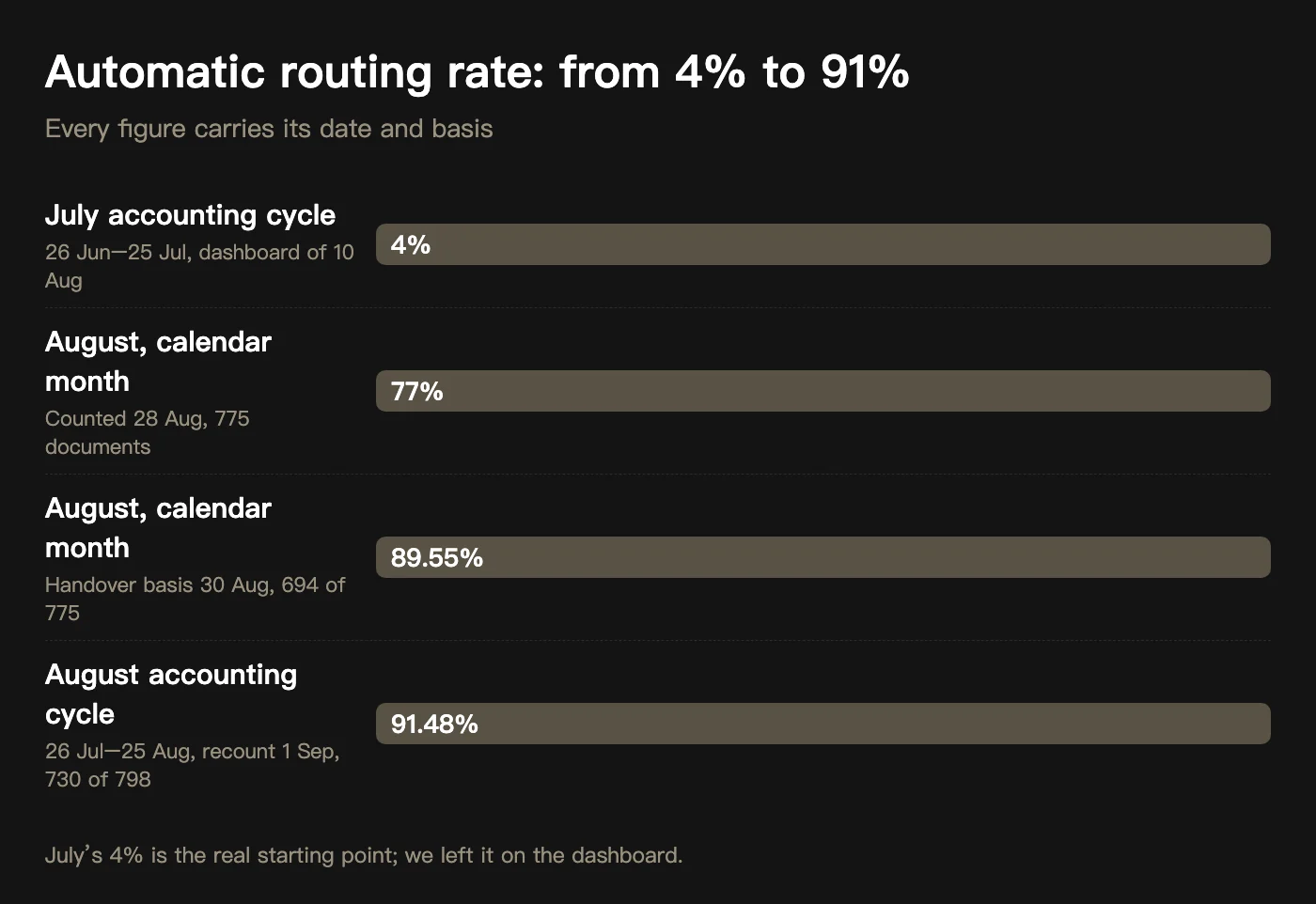
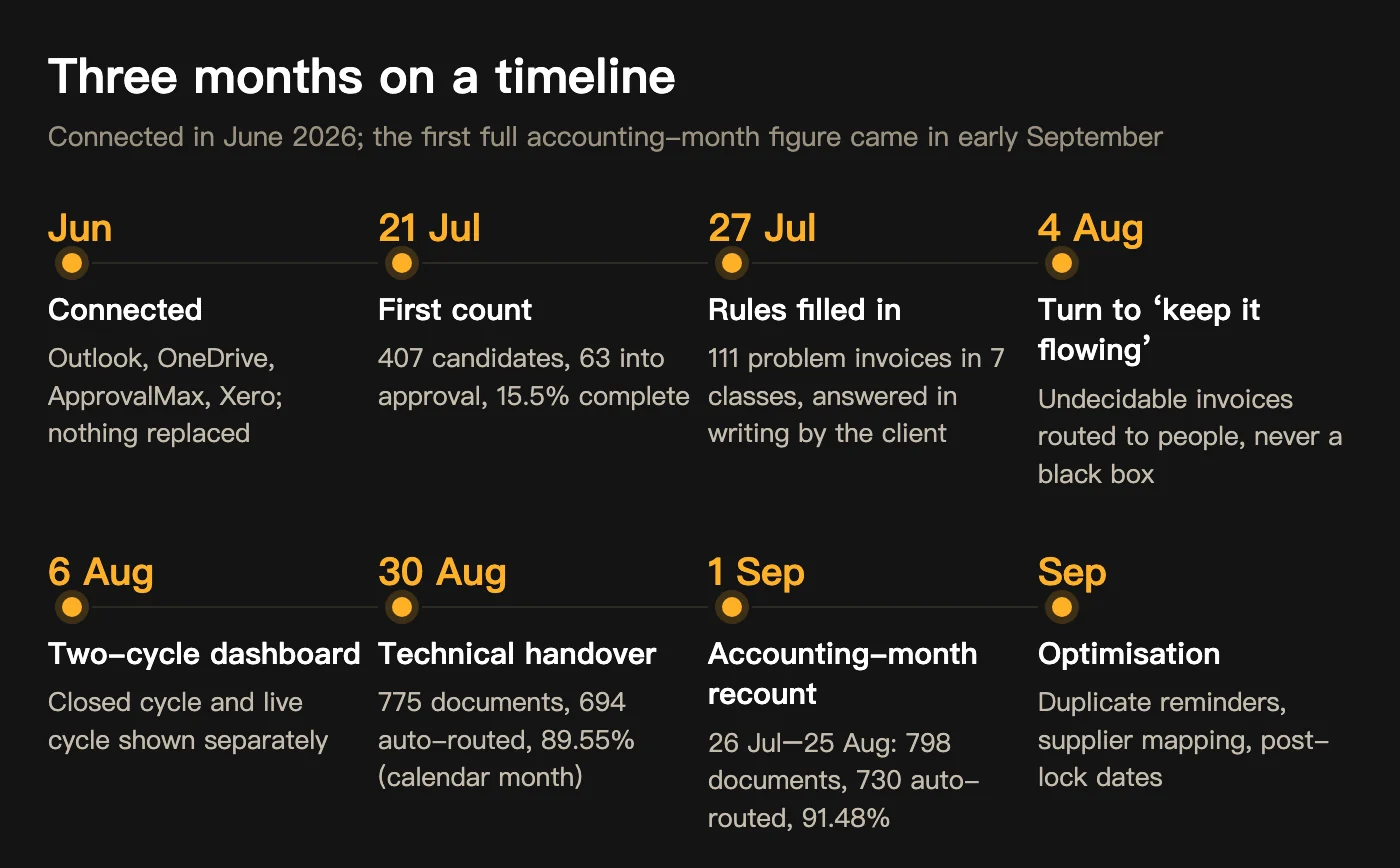
A New Zealand construction head contractor with residential, commercial and hotel-refurbishment projects receives 500 to 1,000 supplier invoices a month. Receiving, sorting by site, matching purchase orders, submitting approvals and chasing overdue items all sat with one quantity surveyor (QS). We connected in June 2026, ran real invoices in July and calibrated at full volume in August. On the client’s accounting month (26 July to 25 August): 798 invoice-related documents, 730 routed automatically, 68 in manual review, an automatic routing rate of 91.48% (project review of 1 September 2026, not confirmed in writing by the client). The diagrams below tell what happened in between.
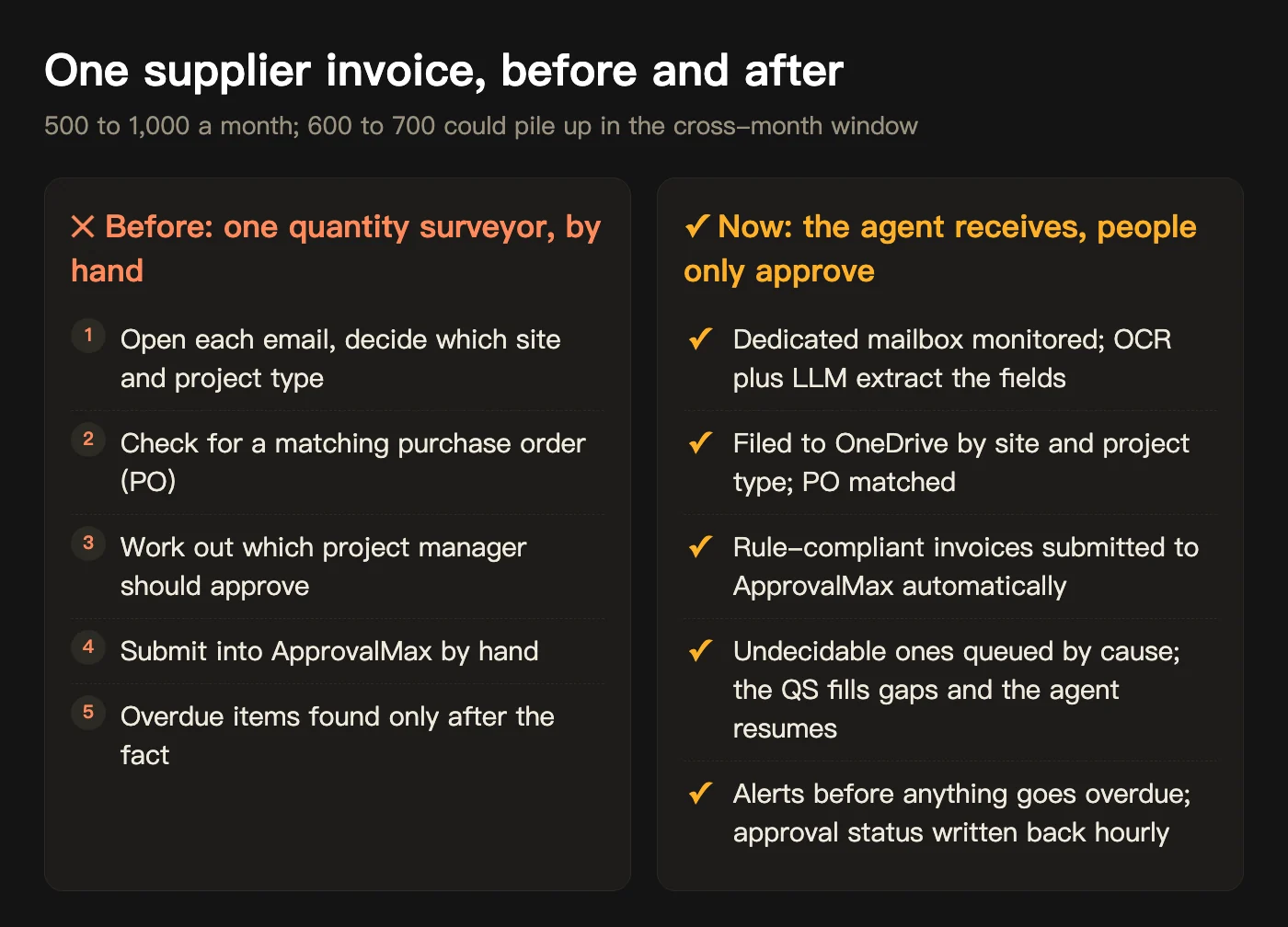
How were invoices handled at the start of each month?
The client’s stack is typical: invoices arrive in Outlook, files live in OneDrive, approvals run through ApprovalMax, the books are in Xero. The 26th to the 3rd is the cross-month window, when 600 to 700 invoices could pile up and the QS had to judge each one’s site, project type, purchase order and approver. The mapping from approver to site was not written down anywhere. It lived in a few people’s experience.
What did we connect?
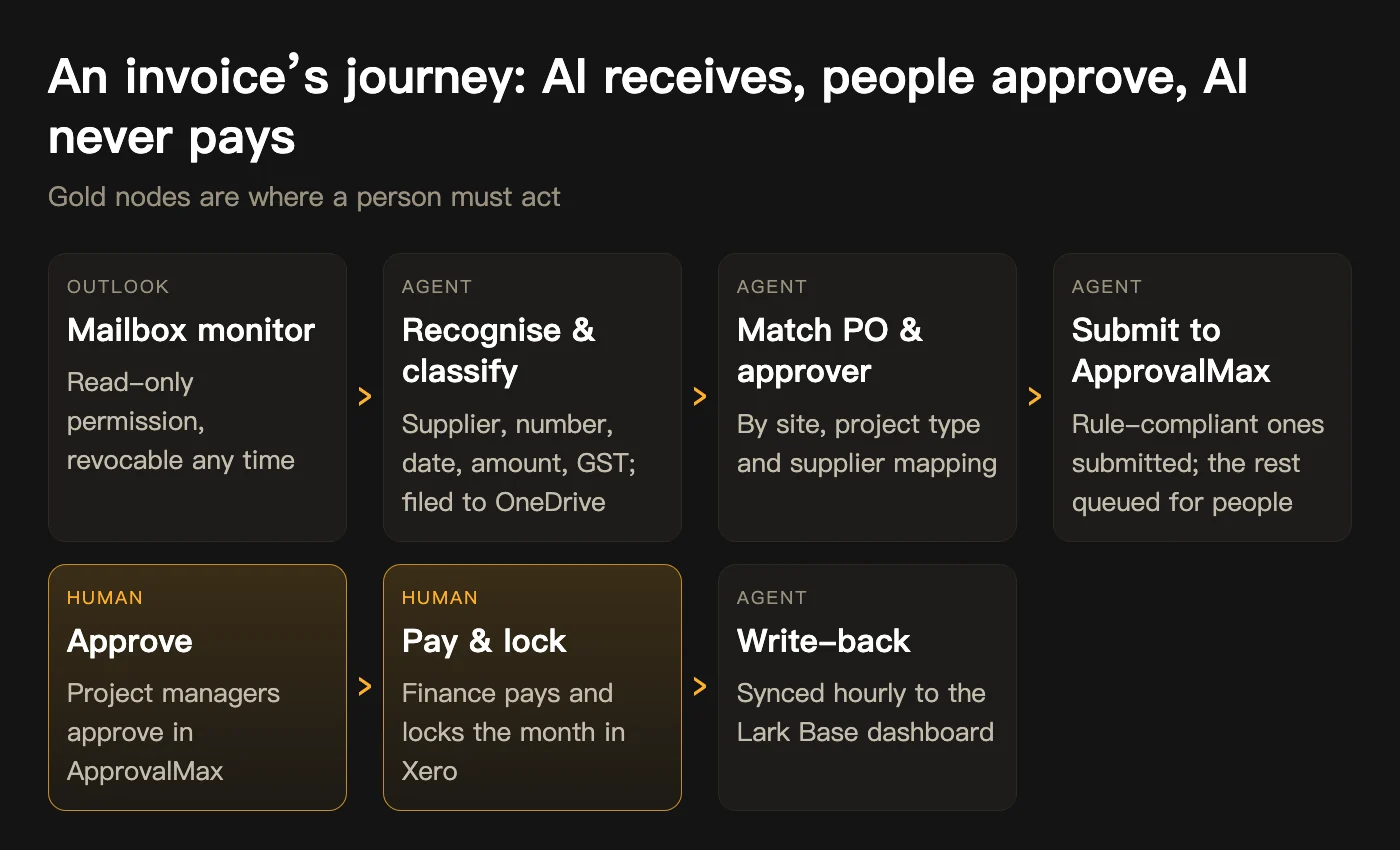
The principle was connect, don’t replace: not one system was swapped. The agent runs on a Mac mini in the client’s office, orchestrated by OpenClaw, watches a dedicated mailbox through read-only permission, recognises, files, matches POs, submits approvals and writes status back hourly. People stay in three places: the QS handles the manual queue, project managers approve in ApprovalMax, finance pays and locks the month in Xero. The AI does not approve, pay or post.
Month one: the problem was rules, not recognition
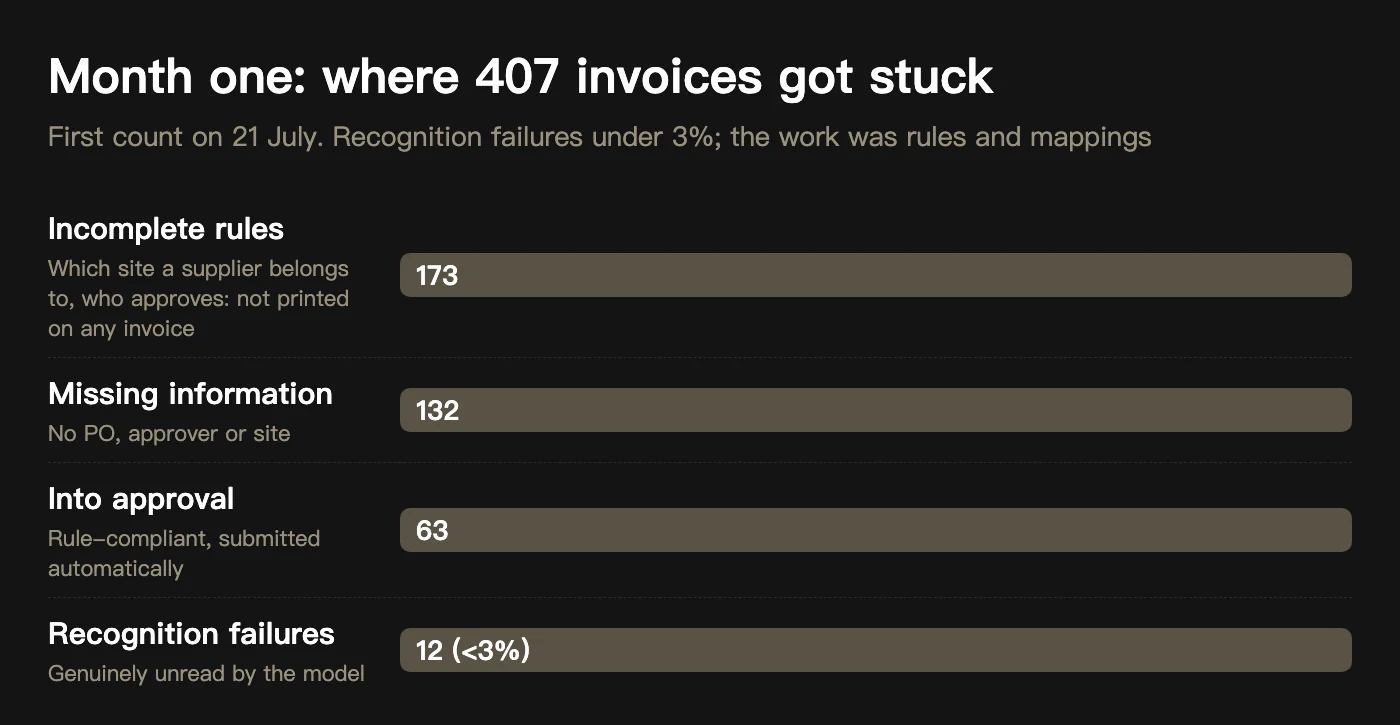
The first count on 21 July: 407 candidate invoices, 63 into approval, 15.5% complete. Broken down, only 12 were genuine recognition failures, under 3%; what blocked the rest was 173 incomplete rules and 132 missing information. The model read invoices very well and then did not know who to hand them to. On 27 July we grouped 111 problem invoices into 7 classes and asked the client to confirm in writing how each should be handled. The workflow went back to running automatically.

How many invoices are there, exactly?
In early August the simplest number stopped reconciling: July’s count went from 369 to 460 to 815 and finally to 517 confirmed invoices. Root causes: recognition, splitting and de-duplication were mixed into one pipeline, and an instruction to clean up processed June invoices was executed by the agent on invoice date rather than received date, removing some July invoices (backed up, recovered the same day). The fix was an independent audit chain that reconciles layer by layer, and a dashboard split into a closed cycle and a live cycle.


The turn on 4 August: keep the flow moving first
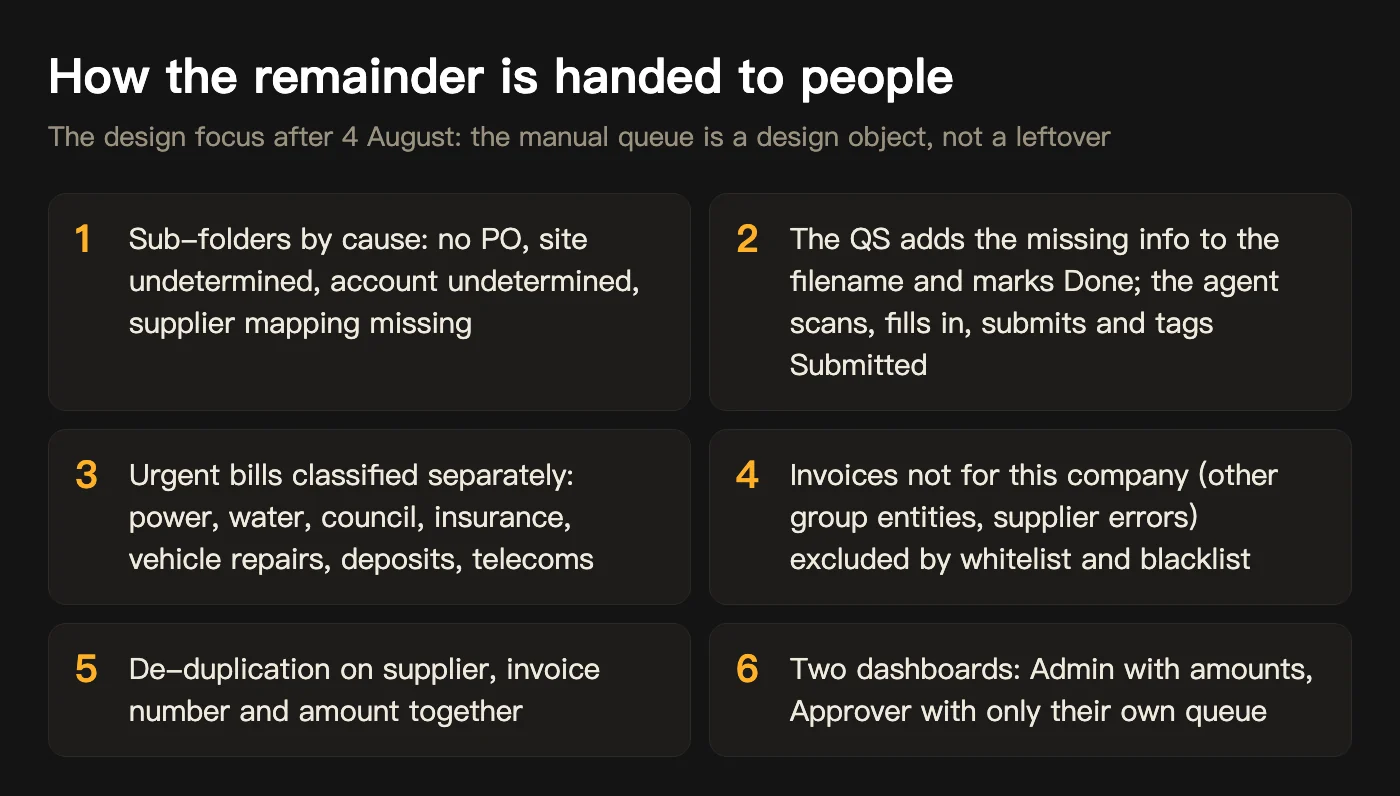
In early August we realised our direction had drifted. The engineer kept tuning recognition rules so more invoices would pass automatically, while the client needed the business to keep flowing first. Invoices the AI could not decide on, even with incomplete information, had to be routed to the right person in an orderly way rather than piled into one Manual Review black box. That was the most important turn in the project, and everything after it was designed around how the remainder gets handed to people.

August: full-volume calibration
Late August was close-out; the manual queue fell from 300-plus to 181, 110, 81. Handover figure on 30 August: 775 documents in the calendar month, 694 routed automatically, 89.55%. Recalculated on 1 September for the client’s accounting period (26 July to 25 August): 798 documents, 730 routed, 68 in manual review, 91.48%. Both bases are stated because the client looks at accounting months and we looked at calendar months.


Who can see the amounts, and who cannot?
Two dashboards: the Admin version for owners and finance shows amounts; the Approver version shows each approver only their own queue, without amounts. Three custom roles in Lark Base, Approver, Admin and AI Master, and the agent writes under AI Master, unable to see what it should not.

The platform’s boundary is where the AI stops
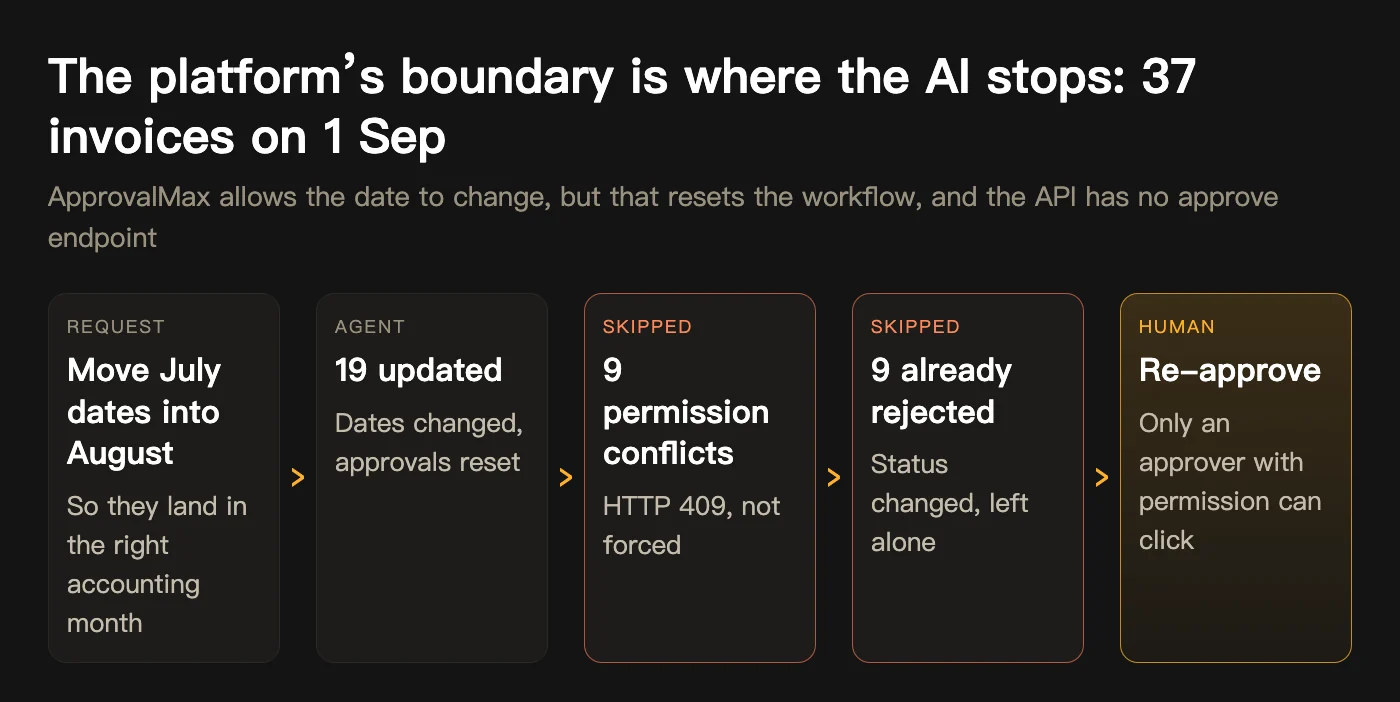
On 1 September the client needed a batch of July invoice dates moved into August. ApprovalMax allows the change, but it resets the approval workflow, and the API has no approve endpoint. Of 37 invoices: 19 updated, 9 skipped on a permission conflict, 9 left alone because they were already rejected. The reset approvals were clicked by people with permission. It became a delivery rule: for approval, payment or external commitments, the AI prepares and checks, and a person presses the last button.
Four lessons from three months
Looking back, the expensive part was not the technology. It was these four judgments.
- A recognition rate alone points the wrong way: Failures under 3%, completion 15.5%. The real work is rules and mappings; what cannot be asked out must be designed as a manual path.
- The ledger needs an independent audit chain: When you cannot say how many invoices arrived, trust goes straight back to zero. Recognition, de-duplication and counting are separate layers that reconcile.
- AI executes instructions literally: Anything that deletes needs a dry run, a backup and a second data source.
- Tell the client about the process: Move from feature done to business running; fixed steps and multiple choice instead of open questions; find and close problems proactively.
Where is it now?
The technical phase was handed over on 30 August and September is an optimisation period: duplicate reminders, supplier misclassification, post-lock date adjustments. The best acceptance test was not a number: in early September the client introduced us to their construction insurance broker, another industry heavy on documents and compliance.
Evidence boundary: every figure in this article comes from the project chat record and the project review document of 2 September, each dated. 91.48% is measured on the client’s accounting period and 89.55% on the calendar month; both denominators include non-invoice files. The client is a New Zealand construction head contractor and is anonymised; company and personal names in screenshots have been cropped or masked, and dashboards showing amounts were not used.
In this New Zealand AI implementation case study, what does the AI do and what do people do?
Do we need to replace Xero or ApprovalMax?
What does a 91% automatic routing rate mean, and what about the other 9%?
How long until invoice automation shows results?
What Is a Boss AI Clone? How to Turn a Business Owner’s Judgement into an AI Agent Your Team Can Ask
What is a boss AI clone, how is it different from ChatGPT, how is one built, how long does it take, how is it installed in Lark or WeCom, and what can it not do? Answered with the BossClone six-layer process, walkthrough screenshots and records from six clients.
Read articleHow Businesses Use AI to Improve Efficiency: Five Workflow Levers From Dated Project Records
How do businesses use AI to improve efficiency? Not by replacing software, but by connecting AI agents to the repetitive, rule-based, data-ready steps inside existing processes. Using four BEE Sigma projects from 2026 with dated records (91.48% invoice routing, site timesheets in 10 weeks, sales reconciliation in 11 days, cross-border orders in 90 days), this article sets out five efficiency levers: document routing, field data entry, cross-system reconciliation, customer orders and market reach, with what the AI does, what people do and how long each takes.
Read article